
For builders and remodelers
The brief is already written. Give the client one place to read it.
A building project gathers facts in different places before work begins: a scope in a PDF, dates in a message, a budget in an estimate, and the name of the person running the site in somebody else's contacts. Each fact may be clear on its own while the client still lacks one current view of the job.
That gap gets wider during a remodel. Choices about finishes, access and sequencing arrive between visits, while a change that sounds small can affect cost or timing. A page cannot make those decisions, but it can show what has been supplied, what remains open and who reviews the next request.
The useful version keeps estimates labelled, separates a proposed date from progress already made, and leaves permits, guarantees and contract language alone unless the builder supplied them. The client gets clarity without the page pretending to be the legal agreement.
What went in.
What came back.
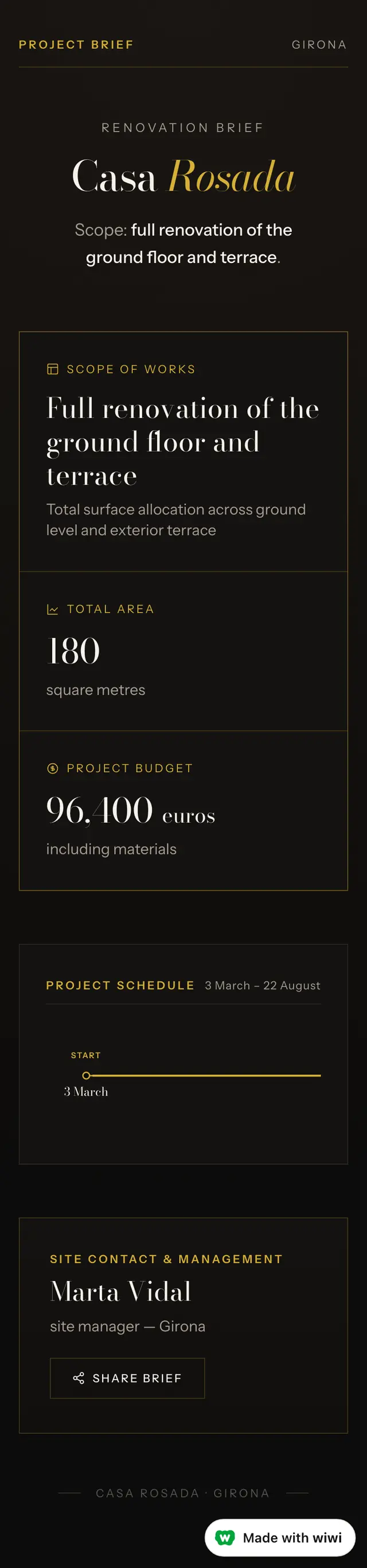
A dark client-facing brief with the scope, area, project budget, start, completion and site contact kept together. It is live right now — open it and check.
Three more things you could send from the same thread
- A page from a video you filmedWalk round talking about it. What you said becomes the words, and the best frames become the pictures.
- A gallery of your photosThe trip, the job, the wedding, the house you finally finished. Or everything in it, photographed for the insurance.
- A form people fill inAsk for the date, the size, the budget — whatever you need before you can answer them. It arrives on WhatsApp.
- A price list you change by messagingThe menu, the rates, the timetable, what is included. When the price goes up you say so in the thread.
What it will not do
Nine things, straight off the product’s own list. If one of them is what you need, this is the wrong tool and it is better to know now.
- changing what an entry SAYS from the conversation, or rewriting a stranger's submission anywhere
- deleting the account itself — wiping everything we hold about the owner and closing them down
- cutting stills from a video longer than twenty minutes
- an account or a login for anybody who is not the owner — a customer, a team-mate, a guest
- a page that takes money from the people who open it — a checkout, a card field, a shopping basket
- exporting a PDF of a page that is NOT a proposal, a quote or a budget — a gallery, a menu, a price list, a shop or anything interactive
- a second person editing the page itself
- editing or cutting a video file
Questions builders and remodelers ask
Can wiwi make a project page from a builder's existing PDF?
wiwi reads the document the builder sends and turns the supplied facts into a page that works on a phone. The Casa Rosada example came from a short brief containing the scope, area, budget, two dates and site manager; the page did not need those details retyped into a form.
What happens if the generated page overstates a fact?
The builder can correct the wording in WhatsApp and keep the same link. The first Casa Rosada draft called the figure an approved budget even though the source only said budget; the correction changed the label to project budget rather than turning an unsupported assumption into permanent copy.
Can a client request a change through a wiwi page?
A builder can add a form asking what should change, where, why, and what timing matters. The response is saved privately for review. Submitting it does not approve the change, set its price, or alter the programme until the builder decides what follows.
Can the project page be updated as the work moves on?
A project page can be revised in the same WhatsApp conversation, so the address the client already has stays useful. The builder supplies the new status, photographs or decisions; wiwi changes the page without inventing progress from the date or the appearance of a photograph.
Turn the job details into something you can send.
Send Wiwi a voice note, photos, video or the figures in WhatsApp. It can make a proposal, invoice or customer-ready page.
Tell Wiwi what you need